Filtering the Catalog
Audience: All
Overview
The Catalog can be filtered by any combination of owner, kind, type, lifecycle, processing status, namespace, and name. Catalog filters provides information on how to modify the available filter criteria.
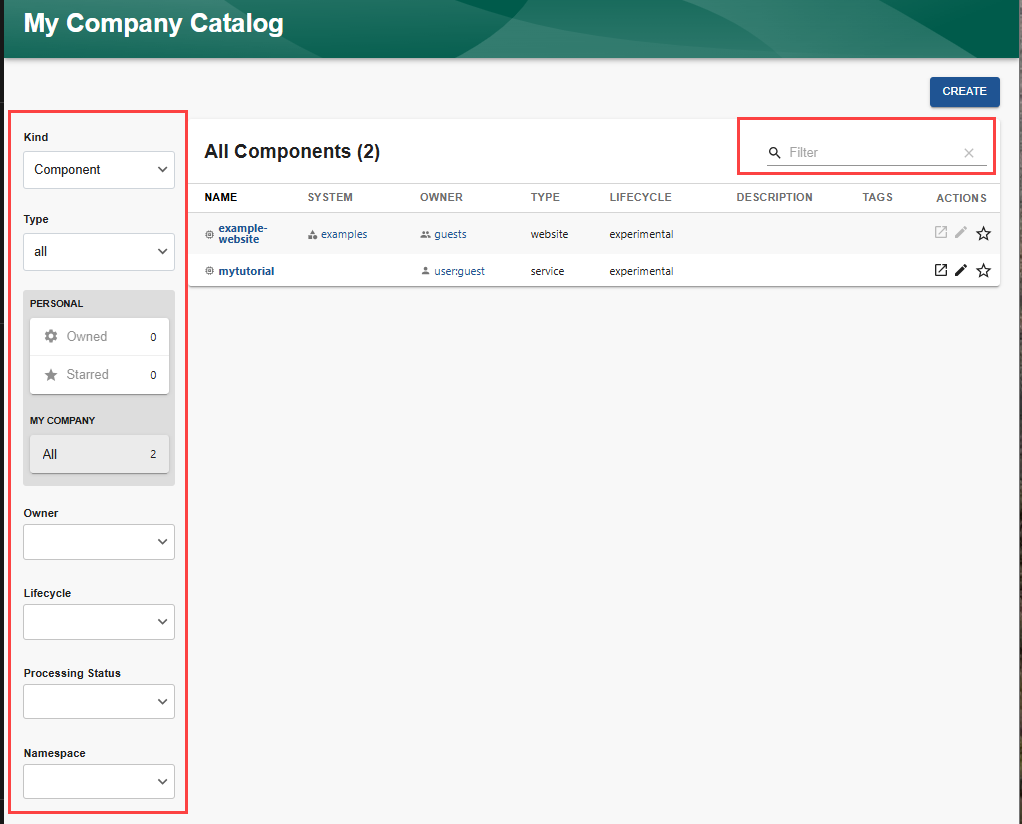
The Technical Overview provides a description of the types of entities displayed in the Catalog.
Filtering the Catalog
You can filter the Catalog using a combination of the following:
-
Filter by name
Enter one or more consecutive letters into the
Filterfield. As you type the letters, the entities whose names do not contain that string will be filtered out of the displayed list.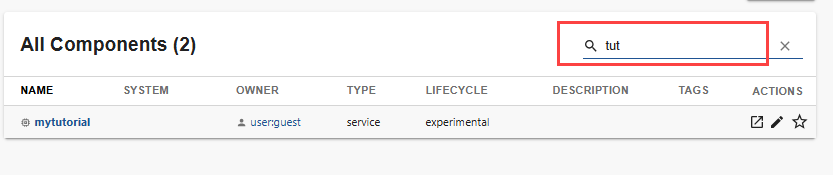
-
Filter by kind
Use the
Kinddropdown list to select which kind of entity to show in the list:- API
- Component
- Group
- Location
- System
- Template
- User
-
Filter by Type
Use the
Typedropdown list to select which type of entity to show in the list. The selections available in the dropdown list depend on the kind of entity selected in theKindlist, and the types of entity you have registered for that kind. -
Filter by Owner
Use the
Ownerdropdown to filter the Catalog list by who owns the entity. -
Filter by Lifecycle
Use the
Lifecycledropdown to filter the Catalog list by lifecycle. -
Filter by Processing Status
Use the
Processing Statusdropdown to restrict the displayed list to only include those entities which are orphaned or in error. -
Filter by Namespace
Use the
Namespacedropdown to filter the catalog list by namespace associated with the entity.